
Last updated on
Oct 19, 2026

Get the free US Medicare Supplementary Medical Insurance Enrollment Form
We are not affiliated with any brand or entity on this form

Fill out
Complete the form online in a simple drag-and-drop editor.

eSign
Add your legally binding signature or send the form for signing.

Share
Share the form via a link, letting anyone fill it out from any device.

Export
Download, print, email, or move the form to your cloud storage.
Why pdfFiller is the best tool for your documents and forms


End-to-end document management
From editing and signing to collaboration and tracking, pdfFiller has everything you need to get your documents done quickly and efficiently.
Accessible from anywhere
pdfFiller is fully cloud-based. This means you can edit, sign, and share documents from anywhere using your computer, smartphone, or tablet.
Secure and compliant
pdfFiller lets you securely manage documents following global laws like ESIGN, CCPA, and GDPR. It's also HIPAA and SOC 2 compliant.
What is Medicare Enrollment Form
The US Medicare Supplementary Medical Insurance Enrollment Form is a government document used by individuals to enroll in Medicare's supplementary medical insurance benefits plan.
pdfFiller scores top ratings on review platforms




Who needs Medicare Enrollment Form?
Explore how professionals across industries use pdfFiller.

Medicare Enrollment Form is needed by:
-
Individuals eligible for Medicare benefits.
-
Senior citizens seeking supplementary health insurance.
-
Those needing to cover additional healthcare costs.
-
Families assisting eligible applicants.
-
Healthcare providers helping patients enroll.
Comprehensive Guide to Medicare Enrollment Form
What is the US Medicare Supplementary Medical Insurance Enrollment Form?
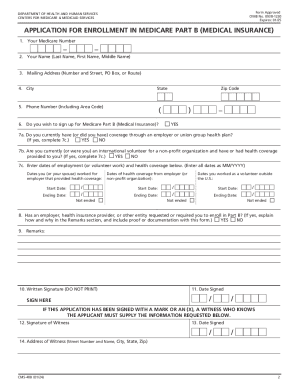
The US Medicare Supplementary Medical Insurance Enrollment Form, known as the CMS-4040 form, plays a crucial role in the Medicare system. It enables eligible individuals to apply for supplementary medical insurance, which helps cover additional healthcare costs not included in standard Medicare plans. The form comprises essential components, such as fields for personal information and consent requirements, ensuring a streamlined application process for Medicare enrollment.
Purpose and Benefits of the US Medicare Supplementary Medical Insurance Enrollment Form
This form is vital for accessing Medicare benefits, allowing users to obtain supplementary medical insurance. By completing the CMS 4040 form, applicants can ensure coverage for services like hospital stays, doctor visits, and some preventive care. The advantages of supplementary medical insurance include reduced out-of-pocket expenses, increased access to healthcare services, and improved financial security in managing healthcare costs.
Eligibility Criteria for the US Medicare Supplementary Medical Insurance Enrollment Form
To apply for Medicare Supplementary Medical Insurance, individuals must meet specific eligibility criteria. Generally, applicants should be age 65 or older, or under 65 with certain disabilities. Additionally, candidates must be residents of the US and hold a valid Social Security Number. Understanding these requirements is essential for successfully completing the Medicare application process using the form.
How to Fill Out the US Medicare Supplementary Medical Insurance Enrollment Form Online
Filling out the CMS 4040 PDF online can be a straightforward process by following these steps:
-
Access the form on a PDF editing platform like pdfFiller.
-
Begin by entering personal details, including full name and contact information.
-
Provide your Social Security Number and date of birth accurately.
-
Review all entered information to minimize errors.
-
Complete the signature section as required.
Utilizing pdfFiller's tools can streamline the data entry process and enhance accuracy in form completion.
Field-by-Field Instructions for the US Medicare Supplementary Medical Insurance Enrollment Form
Each section of the CMS 4040 form requires specific information:
-
Name and contact details need to be clear and legible.
-
Provide your Social Security Number to verify identity.
-
Include your date of birth to confirm eligibility.
-
The form requires a signature from the applicant for authorization.
-
Gender identification is captured through checkboxes.
Properly completing these fields ensures compliance with Medicare enrollment requirements.
Common Errors and How to Avoid Them on the US Medicare Supplementary Medical Insurance Enrollment Form
Applicants often make mistakes when filling out the CMS 4040 form. Common errors include:
-
Inaccurate personal information, such as misspelled names or incorrect Social Security Numbers.
-
Omitting required signatures, leading to delays in processing.
-
Failing to verify eligibility criteria before submission.
To avoid these issues, double-check all entries and ensure you meet the eligibility requirements before submitting the form.
Submission Methods for the US Medicare Supplementary Medical Insurance Enrollment Form
Once the CMS 4040 form is completed, applicants have several submission options:
-
Mail the completed form to the appropriate Medicare office.
-
Submit the form online through authorized platforms like pdfFiller.
Choosing the right submission method can expedite the application process for Medicare enrollment.
What Happens After You Submit the US Medicare Supplementary Medical Insurance Enrollment Form?
After submitting the CMS 4040 form, applicants can expect the following steps:
-
Receive confirmation of submission via email or postal mail.
-
Track the application status using the designated Medicare tracking system.
-
Be aware of the approval timeline, which typically varies by processing volume.
Understanding these steps ensures applicants know what to expect after submission and helps manage their Medicare benefits enrollment efficiently.
Why Choose pdfFiller for Your US Medicare Supplementary Medical Insurance Enrollment Form Needs?
pdfFiller offers valuable features for completing the CMS 4040 form effortlessly. Some of the benefits include:
-
User-friendly interface for easy form filling and eSigning.
-
Ensured security through 256-bit encryption and compliance with HIPAA/GDPR regulations.
-
Online access to forms from any device without needing downloads.
Choosing pdfFiller for your Medicare enrollment needs guarantees a secure and straightforward experience.
Get Started Today with the US Medicare Supplementary Medical Insurance Enrollment Form Using pdfFiller
Start your application journey for Medicare Supplementary Medical Insurance today with pdfFiller. The platform provides comprehensive tools and customer support to assist you in filling out your forms accurately and securely.
How to fill out the Medicare Enrollment Form
-
1.Access the US Medicare Supplementary Medical Insurance Enrollment Form by visiting pdfFiller's website. Use the search function to locate the CMS-4040 form easily.
-
2.Open the form and review the fillable fields. Familiarize yourself with each section before proceeding to fill it.
-
3.Gather necessary information such as your full name, Social Security Number, date of birth, and residency details to ensure a smooth filling process.
-
4.Start by entering your personal details in the designated fields. Be sure to double-check spelling and accuracy.
-
5.Fill in any required checkboxes, such as gender, to complete the demographic information.
-
6.Once your information is entered, review all completed fields carefully for any errors or omissions.
-
7.After finalizing your entries, look for the signature line. Use pdfFiller to electronically sign your form, ensuring compliance with signing requirements.
-
8.Save your completed form in your preferred format, or choose to download it directly to your device.
-
9.If needed, you can submit the form electronically through pdfFiller, or print it for manual submission as per the instructions provided.

Who is eligible to apply using the CMS-4040 form?
Individuals eligible for Medicare benefits, typically those aged 65 and older, can apply using the CMS-4040 form. Ensure that you have met the necessary qualifications before starting the enrollment process.
What information do I need to complete the CMS-4040 form?
To complete the CMS-4040 form, gather your name, Social Security Number, date of birth, and residency details. This information is essential for verifying your eligibility for Medicare benefits.
What happens after I submit the CMS-4040 form?
After submission, your application will be reviewed by Medicare for eligibility determination. Processing times can vary, so check your application status if necessary.
Are there any deadlines for submitting the CMS-4040 form?
While there are no strict deadlines, timely submission is recommended to avoid delays in coverage. It's best to submit your application as soon as you become eligible for Medicare benefits.
Can someone assist me in filling out the CMS-4040 form?
Yes, trusted family members or healthcare providers can assist you in filling out the CMS-4040 form. They can help gather information and ensure accuracy before submission.
What common mistakes should I avoid when filling out the form?
Common mistakes include leaving required fields blank, misspelling your name or Social Security Number, and forgetting to sign the form. Review your entries carefully to avoid these issues.
Is notarization required for the CMS-4040 form?
No, notarization is not required for the CMS-4040 form. Simply fill it out, sign it, and submit it as instructed.
Related Content
Related Forms



Get the latest insights from our blog


If you believe that this page should be taken down, please follow our DMCA take down process
here
.
This form may include fields for payment information. Data entered in these fields is not covered by PCI DSS compliance.